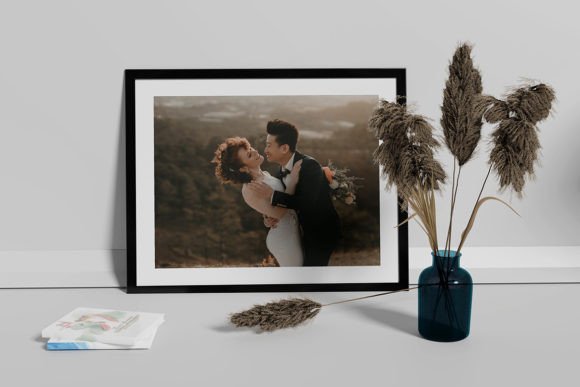
Frame Mockup Wedding Wall: A Strategic Tool for Presenting Wedding Design Concepts
When it comes to showcasing wedding design concepts, the difference between a good presentation and a great one often lies in how realistic and professional the visuals appear. This is where the Frame Mockup Wedding Wall becomes an essential asset for designers, planners, and entrepreneurs in the wedding industry. Designed as a high-quality Photoshop (PSD) template with smart-object features, this tool allows users to present their designs in a lifelike 3D environment that mimics a real-world setting—specifically, a wall display at a wedding venue.
What Is Frame Mockup Wedding Wall?
The Frame Mockup Wedding Wall is a digital template created for Adobe Photoshop. It enables users to place their design files—such as invitations, programs, signage, or branding materials—into a pre-built mockup of a framed display on a wall. The mockup includes realistic lighting, shadows, and textures, which help visualize how the final product will look when printed and hung up in an actual event space.
This template is particularly valuable for those who want to show clients what their design will look like in context without the need for physical samples. With dimensions of 4500×3000px at 300 DPI, it ensures crisp, clear images suitable for both digital presentations and print-ready outputs.
Why Use Frame Mockup Wedding Wall Strategically?
Incorporating the Frame Mockup Wedding Wall into your workflow isn’t just about aesthetics—it’s about strategic communication and client engagement. Here’s why:
- Professional Presentation: Clients expect a polished look when reviewing design options. Using a 3D mockup adds a layer of professionalism that flat images simply can't match.
- Efficiency and Flexibility: Thanks to smart object layers, you can replace the sample design with your own in seconds. This feature is ideal for iterating quickly during the design review process.
- Enhanced Decision-Making: Seeing a design in a realistic context helps clients make better decisions. They can judge readability, color harmony, and spatial fit more accurately than from isolated graphics.
- Brand Consistency: You can customize the background color and shadow tone to align with your brand identity or the client's wedding theme, reinforcing visual consistency across all materials.
- Learning and Growth: For freelancers and new designers, experimenting with different layout variations using this mockup provides hands-on experience in understanding design placement and viewer perception.
Real-World Use Cases and Planning Tips
Whether you're running a boutique design studio or managing a large-scale wedding planning agency, the Frame Mockup Wedding Wall can be used in several practical ways:
- Client Proposals: When presenting a proposal to a couple, include mockups of key items such as save-the-dates, invitations, and table cards placed on a virtual wall. This gives them a tangible sense of how the event will look.
- Portfolio Development: Showcase your best work by placing each design in the same mockup format. This creates a cohesive portfolio that highlights your attention to detail and realism.
- Marketing Materials: Use the mockup in your promotional content—like social media posts, blog articles, or email newsletters—to demonstrate the quality and versatility of your design services.
- Collaboration with Vendors: Share mockups with other vendors involved in the wedding (photographers, florists, venue coordinators) to ensure everyone has a shared vision of the aesthetic direction.
To plan effectively with the Frame Mockup Wedding Wall, consider the following tips:
- Prepare your design assets in the correct resolution and file format before importing them into the smart object layers.
- Test the mockup with various backgrounds to see how your design adapts. A neutral tone might suit some projects, while others may benefit from a bold or textured backdrop.
- Use the PDF help file included in the template to learn how to manipulate the smart objects efficiently. Understanding the structure of the PSD file can save time and reduce errors.
- Consider the lighting and shadow settings within the mockup to reflect the intended ambiance of the wedding. Soft shadows can convey elegance, while sharper ones might suggest modernity.
Strategic Considerations Before Relying on Frame Mockup Wedding Wall
While the Frame Mockup Wedding Wall offers significant advantages, its effectiveness depends on how thoughtfully it’s applied. Here are some considerations to keep in mind:
Know Your Audience: Not every client needs a full mockup. If you’re working with couples who prefer minimalism or have limited budgets, a simpler presentation might be more appropriate. However, if your target audience values premium experiences and detailed visuals, this mockup can elevate your offerings.
Match the Mockup to the Project Stage: In early brainstorming phases, mockups can inspire ideas and spark conversations. In later stages, they serve as confirmation tools to ensure final designs meet expectations. Using the Frame Mockup Wedding Wall at the right moment increases its impact and reduces unnecessary revisions.
Don’t Overlook Context: A mockup is only as useful as the message it supports. Ensure your use of the Frame Mockup Wedding Wall aligns with your overall project goals and client communication strategy. Randomly applying it without purpose can dilute its value.
How to Approach Frame Mockup Wedding Wall Like a Pro
Here’s a step-by-step approach to get the most out of the Frame Mockup Wedding Wall:
- Select the Right Design: Choose the design element you want to showcase—whether it's a single invitation or a suite of related pieces.
- Open the PSD File: Import your design into the smart object layers provided in the template. Make sure the aspect ratio matches the placeholder to avoid distortion.
- Customize Background and Shadows: Adjust the background color and shadow tone to match the wedding theme or the venue where the design will be displayed.
- Export for Sharing: Once satisfied, export the mockup in a high-resolution format suitable for client presentations or marketing purposes.
- Iterate Based on Feedback: If changes are requested, return to the smart object layer and update the design. Re-export and share the revised version immediately.
This streamlined workflow supports not only productivity but also creativity. By focusing on the mockup itself rather than struggling with formatting, you can dedicate more time to refining the design elements that truly matter.
Possible Risks and Mitigation Strategies
Using the Frame Mockup Wedding Wall without a clear objective can lead to inefficiencies or miscommunication. For example:
- Overuse: Sending too many mockups can overwhelm clients. Limit usage to key deliverables and always explain the reasoning behind the visualization.
- Lack of Customization: Leaving the default background and shadow colors can make your presentation feel generic. Always tailor the mockup to reflect the specific wedding style and client preferences.
- Unrealistic Expectations: While mockups are powerful, they don’t account for all environmental factors. Clearly communicate that the final product may vary slightly based on printing methods and installation conditions.
To mitigate these risks, start by defining what you want to achieve with each mockup. Ask yourself: “Is this the best way to convey the design concept?” and “Will this support the client’s decision-making process?” Keeping these questions in mind ensures intentional use rather than random application.
Long-Term Value and Creative Positioning
Investing in tools like the Frame Mockup Wedding Wall can position you as a forward-thinking designer or planner. As weddings become increasingly personalized and visually driven, the ability to present designs in a realistic context is a competitive advantage.
Over time, consistent use of this mockup can build trust with clients. When they see how your designs translate into real-world applications, they’re more likely to choose your services over competitors who rely solely on flat images or basic text descriptions.
Additionally, the mockup serves as a learning resource. Educators and mentors can use it to teach students about spatial design, typography, and branding in a practical setting. Hobbyists or small business owners can leverage it to experiment with layouts and improve their skills without expensive software or equipment.
Decision-Making Guidance for Maximum Impact
To use the Frame Mockup Wedding Wall effectively, follow this decision-making framework:
- Define Objectives: Are you trying to win a client’s approval? Showcase a portfolio piece? Or train a team member? Your goal will shape how you use the mockup.
- Assess Client Needs: Will the mockup help the client envision the final product? If yes, proceed. If not, consider alternative presentation methods.
- Evaluate Production Workflow: Does the mockup integrate smoothly into your current design process? If it adds complexity without clear benefits, reconsider its role.
- Measure Outcomes: After using the mockup, track whether it improved client satisfaction, reduced revisions, or enhanced your brand image. Use this data to refine your approach.
By embedding these questions into your routine, you ensure that the Frame Mockup Wedding Wall remains a strategic tool rather than a gimmick.
Final Thoughts on Strategic Application
The Frame Mockup Wedding Wall is more than just a design accessory—it’s a tool that supports clarity, efficiency, and creativity in wedding-related projects. When used intentionally, it can enhance communication, streamline workflows, and contribute to long-term brand growth.
Remember, the power of any mockup lies in its ability to tell a story. Whether you’re pitching a new design, refining an existing one, or educating a client, the Frame Mockup Wedding Wall should serve a clear purpose in that narrative. With thoughtful application, it can become a cornerstone of your creative and operational toolkit, helping you deliver results that are both beautiful and meaningful.