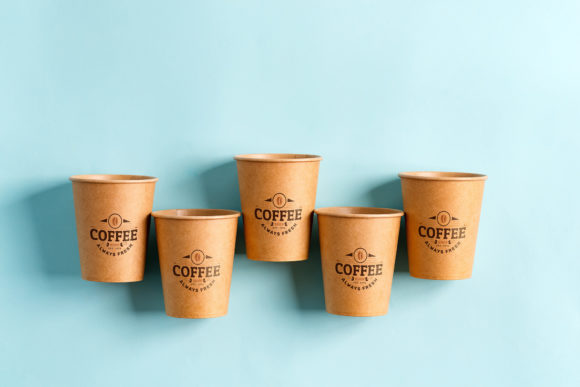
Paper Cup Mockup: A Practical Tool for Design Presentation
For designers and creative professionals, showcasing their work effectively is essential. One tool that has gained popularity in this space is the Paper Cup Mockup. This resource provides a realistic visual environment where users can present their artwork, brand designs, or promotional materials on paper cup scenes. It allows for quick and easy integration of custom designs into pre-made layouts, making it a useful asset for digital marketing, portfolio building, and product visualization.
What Is Paper Cup Mockup?
The Paper Cup Mockup is a Photoshop file that includes high-quality images of paper cups in various settings. These mockups are designed to help users visualize how their branding or artwork would look when printed on real-world objects. The set usually features multiple variations of paper cups, such as different sizes, angles, and lighting conditions, providing a flexible platform for creative presentation.
Each mockup is structured with smart layers and active smart objects. This means you can easily replace the default design with your own by pasting it into a designated placeholder area. The inclusion of a safety zone within each smart object ensures that your design stays properly aligned and visible without being cropped out unintentionally.
Why Someone Might Be Interested in Paper Cup Mockup
If you're involved in graphic design, especially in areas like packaging, event promotion, or beverage branding, the Paper Cup Mockup offers a convenient way to present your ideas. It's particularly valuable for those who need to create visuals for social media platforms such as Instagram and Facebook, business websites, blogs, postcards, and invitations. The ability to generate professional-looking mockups quickly can save significant time during the design review or client approval process.
Additionally, the mockup’s versatility makes it an appealing option for businesses looking to maintain a consistent aesthetic across different marketing channels. Whether you're designing for a café, a product launch, or a promotional campaign, having a reliable template can streamline your workflow and enhance your presentations.
Benefits of Using Paper Cup Mockup
- Time Efficiency: With smart layers and placeholders already in place, inserting your design is straightforward. You don’t have to start from scratch, which speeds up the production process.
- Realistic Visuals: The mockups offer a photorealistic representation of paper cups, helping you demonstrate your designs in context.
- Multi-Use Format: Suitable for both print and digital media, including social posts, web banners, and physical invitations, the mockup supports a wide range of applications.
- Customization Control: The safety zones allow you to see exactly where your design will appear, reducing errors and ensuring a polished final output.
- Single File Convenience: All necessary layers and mockup variations are included in one Photoshop file, simplifying management and organization.
Tradeoffs and Considerations
While the Paper Cup Mockup offers several advantages, there are also some limitations to consider before using it. First, it requires at least a basic understanding of Adobe Photoshop. If you're unfamiliar with smart objects or layer manipulation, there may be a learning curve involved.
Another important point is that these mockups are based on actual photographs, not 3D models or vector graphics. This means the background or color scheme cannot be altered within the provided files. Users must accept the existing environment and lighting conditions unless they’re willing to invest additional effort in editing the background manually.
Also, since the illustrations used in the examples are for demonstration purposes only and are not included in the archive, you'll need to ensure your own artwork fits the intended use case. For instance, if you're designing for a specific event or product line, you should verify that your content aligns with the style and purpose of the mockup scene.
Situations Where Paper Cup Mockup Excels
The Paper Cup Mockup is most beneficial in scenarios where speed and realism are key. Here are some situations where it could be a strong fit:
- Portfolio Displays: When creating a portfolio to showcase branding or packaging work, using a mockup like this adds a level of professionalism and context that flat images often lack.
- Client Presentations: Providing clients with a realistic view of their products in use can help them better understand the value of your design work.
- Marketing Campaigns: If you're launching a new beverage or coffee brand, this mockup can help you produce eye-catching visuals for online and offline promotions.
- Event Invitations and Posters: The clean and modern layout of the mockup can be adapted for events such as product launches or seasonal campaigns.
When Alternatives May Be Worth Considering
Although the Paper Cup Mockup is highly functional, it may not suit every project. In particular, consider alternative tools or methods if:
- You require fully customizable backgrounds or environments that match your brand’s specific needs.
- Your project demands 3D modeling or interactive elements that go beyond what a static mockup can provide.
- You’re working with a team that prefers collaborative design software or cloud-based solutions.
- You want to integrate the mockup into a larger design ecosystem, such as with motion graphics or video content.
In these cases, investing in more advanced tools or hiring a designer with expertise in photo editing and composition might yield better results. Alternatively, using free or paid mockup generators that support more customization options could also be a viable solution.
Practical Tips for Choosing the Right Mockup
Before committing to the Paper Cup Mockup, assess your project requirements carefully. Ask yourself the following questions:
- Do I have access to Adobe Photoshop and the necessary skills to use it?
- Will the mockup’s fixed background and lighting meet my design goals, or do I need more flexibility?
- Am I looking to create multiple versions of the same design efficiently?
- Is the mockup compatible with the file types I plan to use (e.g., JPEG, PNG)?
If the answer to most of these questions is yes, then the Paper Cup Mockup could be an excellent choice. However, if you find yourself needing more control over the scene or higher technical capabilities, you may want to explore other options.
Final Thoughts
The Paper Cup Mockup is a practical solution for designers who want to present their work in a realistic and visually appealing format. Its ease of use, smart layer functionality, and multi-platform compatibility make it a strong contender for quick and effective design visualization. That said, its limitations—such as the inability to change the background or use it in non-Photoshop workflows—should not be overlooked.
Ultimately, the decision to use this mockup depends on your specific needs, technical proficiency, and the scope of your project. By weighing the benefits against the tradeoffs, you can determine whether it aligns with your creative objectives. If it does, you’ll likely appreciate the efficiency and quality it brings to your design process.