Procreate 3D Model - Mockup Mug: A Game-Changer for Digital Artists and Designers
In the ever-evolving world of digital design, tools that bridge the gap between 2D and 3D creativity are becoming increasingly valuable. One such tool gaining traction among artists, illustrators, and product designers is the Procreate 3D Model - Mockup Mug. This innovative offering brings high-quality 3D assets directly into Procreate, empowering users to visualize their artwork in a realistic three-dimensional context with ease and efficiency.
What Is the Procreate 3D Model - Mockup Mug?
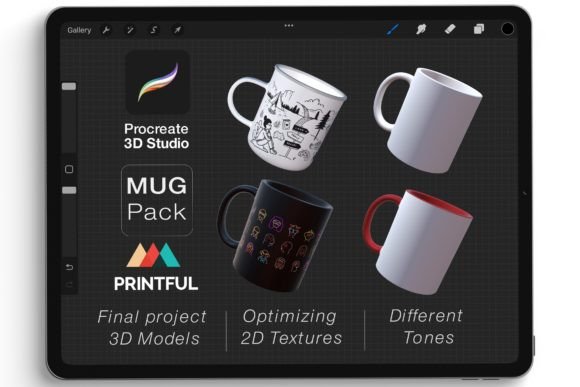
The Procreate 3D Model - Mockup Mug is a set of six meticulously crafted mug models designed specifically for use within Procreate on iPad. These models come in .USDZ format, which is native to Apple's AR platform and allows seamless integration into the Procreate app. Each mug model provides an accurate representation of how a design will appear when applied to a real-world object, making it ideal for showcasing custom artwork, logos, or patterns in a professional setting.
Beyond the models themselves, the package includes geometric brushes tailored for texturing and detailing mugs in true 3D space. This combination gives artists the flexibility to work intuitively—drawing and painting directly onto the surface of a 3D model without needing complex software like Blender or Maya.
Why It Matters in Today’s Creative Landscape
As more businesses shift toward digital-first strategies, the ability to present designs in a realistic 3D format has become essential. Whether you're a freelancer pitching a client or an entrepreneur launching a product line, showing your work on a mockup mug can significantly enhance visual communication. The Procreate 3D Model - Mockup Mug aligns perfectly with this trend by enabling creators to produce polished presentations from within a familiar and powerful 2D illustration environment.
Moreover, the demand for customizable products is growing rapidly. Consumers now expect unique, personalized items—from coffee mugs to phone cases. For those in the e-commerce or print-on-demand industries, being able to quickly generate and preview customized mug designs can streamline workflows and improve customer satisfaction.
Designing in True 3D Space with Procreate
One of the standout features of the Procreate 3D Model - Mockup Mug is its support for true 3D design. Unlike traditional flat mockups that require separate image editing software, these USDZ files allow users to rotate viewpoints and draw directly on the 3D model inside Procreate. This capability opens up new creative possibilities, letting artists explore perspective, lighting, and spatial composition in ways previously reserved for dedicated 3D modeling platforms.
With the intuitive interface of Procreate, artists can easily re-color the mugs, apply textures, or add intricate patterns. The process feels natural, especially for those already accustomed to working in Procreate’s 2D mode. By optimizing 2D textures for 3D application, the Mockup Mug package ensures that every brush stroke translates accurately to the final product, preserving the quality and intent of the original artwork.
High-Quality Files for Realistic Results
The Procreate 3D Model - Mockup Mug comes with high-resolution USDZ files, ensuring that each model is detailed enough to showcase even the most intricate designs. These files are optimized for performance, so they load quickly and render smoothly within Procreate. This level of quality makes them suitable for both personal projects and professional deliverables, such as social media content, portfolio pieces, or marketing materials.
Whether you're illustrating for a brand identity project or preparing visuals for a crowdfunding campaign, having access to a realistic mug model can make all the difference. The Mockup Mug helps you avoid guesswork and deliver results that reflect your vision with precision and clarity.
Easy Customization and Workflow Integration
Customizing a mug design using the Procreate 3D Model - Mockup Mug is surprisingly straightforward. Once imported into Procreate, users can select different views of the mug and begin adding color, texture, or patterns. The built-in tools for adjusting the model's orientation let you see how your design looks from multiple angles, helping you catch issues before finalizing the artwork.
This ease of customization is particularly beneficial for educators and hobbyists who may not have extensive experience with 3D software. You can start experimenting with 3D design elements without a steep learning curve. For example, a graphic design student could create a series of themed mug designs for a class project and instantly see how each one would look in a retail setting.
Geometric Brushes and Creative Possibilities
The Mockup Mug package also includes a collection of geometric brushes, which are invaluable for adding depth, contrast, and realism to your mug designs. These brushes can be used to simulate materials like ceramic, matte finishes, glossy surfaces, or even metallic accents. Their versatility allows for a wide range of stylistic choices, from minimalist and modern to bold and artistic.
Imagine designing a promotional mug for a tech startup. With the right geometric brush, you can give the mug a sleek, glass-like finish that matches the brand’s aesthetic. Or consider a hand-painted mug for a boutique shop—these brushes help bring out the texture and warmth of the paint strokes, making the final render feel tangible and authentic.
Instant Download and Seamless Delivery
One of the practical advantages of the Procreate 3D Model - Mockup Mug is its instant delivery system. After purchasing through Creativefabrica, users receive the files electronically within minutes via email. This rapid turnaround is crucial for creatives who need to meet tight deadlines or experiment with ideas on the fly.
While we don't accept returns, exchanges, or cancellations, the team behind the product encourages buyers to reach out if they encounter any issues during setup or use. This support adds an extra layer of confidence for users who may be trying 3D design for the first time.
How It Fits Into Modern Workflows
For many professionals, workflow efficiency is a top priority. The Mockup Mug fits seamlessly into existing Procreate-based pipelines, eliminating the need to switch between apps for 2D and 3D tasks. This integration saves time and reduces complexity, allowing for a more focused and productive creative session.
Consider a small business owner who sells custom-printed mugs online. Previously, they might have had to rely on third-party mockup generators or hire someone to create 3D renders. Now, they can design and visualize their products entirely in-house using Procreate and the Mockup Mug models. This self-sufficiency not only cuts costs but also accelerates the time-to-market for new designs.
Real-World Applications and Use Cases
- Freelance Illustration: Showcase character designs or patterns on a mug to demonstrate how they scale and interact with form.
- Brand Identity Projects: Present logo mockups on physical objects to give clients a better sense of the design’s impact.
- Educational Purposes: Help students understand how 2D art translates to 3D spaces without investing in advanced tools.
- Print-on-Demand Businesses: Quickly test and refine designs before sending them to production.
- Marketing Campaigns: Create engaging visual content for social media or advertising that stands out with a 3D twist.
Adapting to Changing User Expectations
Today’s audiences expect more than just static images—they want dynamic, interactive, and visually rich content. The Procreate 3D Model - Mockup Mug meets these expectations by providing a way to create and share 3D-ready visuals that can be viewed in augmented reality (AR) or embedded into websites and applications. This adaptability makes the models a valuable asset for creators aiming to stay ahead of the curve in digital presentation techniques.
Additionally, the rise of AR in mobile commerce means that customers can now view products in 3D before purchasing. For those selling custom merchandise, offering AR previews of mug designs can increase engagement and reduce return rates by giving buyers a clearer idea of what they’re getting.
Getting Started with the Mockup Mug Models
If you're new to 3D design in Procreate, the Mockup Mug models offer a gentle introduction. Begin by importing the USDZ file into Procreate using the "Insert Image" feature. From there, you can zoom, rotate, and adjust the model to suit your needs. The geometric brushes included in the package can then be used to add texture and detail to specific areas of the mug.
Here’s a simple workflow:
- Select a base mug model from the six available options.
- Use the Rotate Viewpoint tool to adjust the angle and orientation.
- Apply colors and patterns using Procreate’s standard tools.
- Enhance the surface with geometric brushes to add dimensionality.
- Export the finished design as a video or still image for sharing or printing.
Recommendations for Getting the Most Out of the Models
To maximize the value of the Procreate 3D Model - Mockup Mug, consider the following tips:
- Start with simple designs to get comfortable with the 3D workspace.
- Experiment with lighting and shading to simulate different environments.
- Combine the mug models with other 3D assets for more comprehensive scene setups.
- Use the USDZ files in conjunction with 3D Printful or similar platforms for direct printing and shipping.
- Share your final renders via Instagram, TikTok, or YouTube to attract potential clients or followers.
The Future of 3D Design in Procreate
As technology continues to advance, the intersection of 2D and 3D design will likely grow even more prominent. Tools like the Mockup Mug are paving the way for a new generation of digital artists who seek to blend traditional illustration techniques with emerging 3D technologies. While full 3D modeling may still be the domain of specialized software, the ability to work with pre-built 3D assets in Procreate represents a significant step forward in accessibility and creativity.
We can expect to see more resources like the Procreate 3D Model - Mockup Mug emerge in the coming years—offering everything from clothing mockups to furniture prototypes. For now, the Mockup Mug serves as a perfect entry point into the world of 3D design visualization for Procreate users.
Final Thoughts
The Procreate 3D Model - Mockup Mug isn’t just another digital asset—it’s a versatile and powerful tool that enhances the creative process for a wide range of users. Whether you're a seasoned artist looking to expand your skillset or a beginner eager to explore 3D design, this resource offers something valuable. Its relevance lies in its ability to simplify complex tasks, adapt to modern trends, and deliver professional-grade results—all from within one of the most popular drawing apps available today.